
Start one easy-to-record habit in Loop Habit Tracker
Define one small, specific habit in Loop Habit Tracker, choose when to record it, and use an honest history to review whether your plan is realistic.
Apps and games in this article
Check the version, file format and installation steps before downloading.
 Loop Habit TrackerAPK · v2.3.1 · 10.2 MBView details and downloads →
Purpose and preparation
Habit records are easier to evaluate when the habit is clearly defined. Instead of setting many targets at once, start with one action you can mark as done or not done. Decide when to record it so the history does not depend on remembering what happened several days earlier.
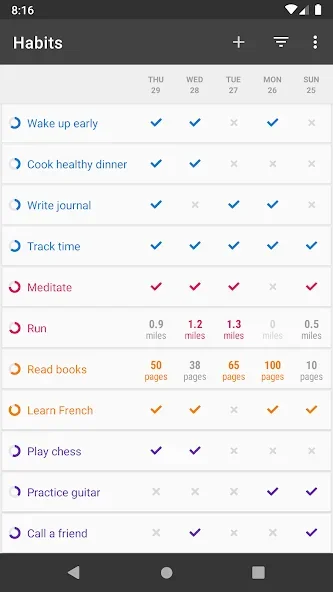
App screenshots
Suggested steps
Start with a clear, recordable habit, such as reading for a few minutes. Use graphs to review consistency without treating one missed day as the loss of all progress.
- Choose one small action, such as reading a few pages, and write down a completion measure that makes sense to you.
- Create the habit with a specific name. Avoid broad labels such as healthy living that do not explain the daily action.
- If you use a reminder, choose a time when you usually have an opportunity to do the activity, rather than simply when you open your phone.
- Record what actually happened. Review several days together before changing the target or adding another habit.
Check the result before continuing
Useful history reflects actions you actually completed. If you miss many days, try making the action smaller or moving it to another time. Do not mark every day as completed just to make the display look tidy; the record helps you assess whether the plan is realistic.
Habit data is stored on the device and needs to be backed up before changing phones. Reminders depend on notification permission and battery settings.